If you've landed here from one of my routine posts - welcome. You've seen the prompts. This is the part that wouldn't fit in a caption: the setup that makes them work.
Because here's what happens without it. You paste a prompt into a fresh chat, and the fresh chat doesn't know your clients. It doesn't know what's in their retainer, what you delivered last week, or that one of them always pays late. So it gives you the same generic answer it would give anyone. Then you decide AI is overhyped and go back to doing everything by hand.
The prompts were never the point. The setup is. And the setup is simpler than you think: build a filing system worth reading, then connect your AI to it. Two steps. This post walks you through both.
Stop treating AI like a search engine
Think about what a co-founder actually is: someone who works alongside you and brings different strengths, so together you build something bigger than you could alone.
That's the relationship I have with Claude. I bring the judgement, the strategy, the client relationships. It brings speed I can't compete with: a proposal drafted in the time it takes me to make a coffee, ten versions of a landing page headline while I'm still thinking about the first.
But you would never hire a co-founder and refuse to tell them anything about the business. And that's exactly what most VAs do with AI. They open a blank chat, type "write an email to my client," and wonder why the result sounds like it was written by someone who has never met their client.
It has never met your client. You haven't done the induction.
Why I bother (the honest version)
I run consistent £10K months on about 3 days a week. That gap between income and hours is not because I type fast. It's because the repetitive chunk of my work now runs through a setup that already knows everything it needs to know.
Two real examples from my client work:
One client's social media manager sends me a 30-day content plan as a PDF. I used to map it all out by hand, which took hours. Now the PDF goes into that client's Claude project, and Claude turns it into a full table of posts and pushes it into ClickUp as tasks. About ten minutes, most of which is me checking it.
Another client sends event briefs as voice notes. The voice note goes into their project, which already knows their preferences and my templates, and I get back a researched shortlist of five venues with the outreach emails drafted. That used to eat half a day.
None of that replaced me. Someone still had to understand the client, spot the problem and set the system up. That someone gets paid a lot more than the person doing the typing.
One thing to know before we start: .md files
AI knowledge bases run on a file type called Markdown - you'll see it as .md. It's just plain text with simple formatting, and it's the format AI reads best.
Here's why that matters: if you live in Google Workspace like me, everything you write gets saved as a Google Doc - and a Google Doc is not an .md file. So every document you want your AI to read has to be converted and downloaded first, which gets frustrating fast.
Keep that in mind, because it's the reason for the tool I'm about to show you.
Step 1: Set up your filing system
This is the foundation, and it's the actual point of this article. Your co-founder can only read what you've written down. If your business lives in your head, your WhatsApp voice notes and eleven Google Docs called "FINAL final v3," there is nothing for it to work from.
So before you touch a single AI tool, you give your business one organised home on your computer.
Download Obsidian. It's a free app, and the easiest way to think about it is a word processor that saves everything as .md files - the exact format AI reads best. You write in it like a normal document, and behind the scenes it's keeping everything in a plain folder on your computer (Obsidian calls this folder a "vault"). No converting, no downloading, no exporting.
Move your business in. You don't need to migrate everything on day one. Open your key documents in Google or Word, copy, and paste them into new notes in Obsidian. Your offers, your prices, your about-me, your client notes, your processes. Every one becomes an .md file your AI can read instantly.
Build the folder structure. Here's a structure to start with - it's a simplified version of mine:
My Business Vault/
├── Identity/           → who you are, your offers, your prices, how you write
├── Vision/             → your goals & where the business is going
├── Business/           → how the business runs: processes, templates, systems
├── Clients/
│   ├── Client A/       → profile, brand voice, retainer, what's live right now
│   └── Client B/       → same structure, every client, every time
├── Social Media/       → strategy, content pillars, plans & drafts
├── Projects/           → time-boxed things with a finish line (a launch, a build)
└── Resources/          → everything reference-y you keep coming back to
That's it. One vault, clearly named folders, one place your AI (and future you) always knows to look.
Keeping it in sync. Obsidian's paid add-on, Obsidian Sync, keeps your vault synced across your devices so it's always current everywhere. You can layer Google Drive on top - but any document that starts life as a Google Doc still has to be converted to .md before your AI can read it. There will always be that friction, which is exactly why I create my documents in Obsidian in the first place.
And the rule the whole thing runs on: if it isn't written down, it isn't real. Every decision, every client preference, every process gets captured into the vault. Do that, and everything in step 2 just works.
Step 2: Connect your AI to it
Now your filing system exists, you connect Claude to it. There are two ways to do this, and they're built for different jobs.
Option A: Claude Projects - start here
A project in Claude is a dedicated workspace with its own knowledge base. Any chat you start inside that project can read everything the project knows - so instead of introducing your business from scratch every time, the context is just there.
And this is where it gets good. When you create a new project in the Claude desktop app, you can now connect it to a folder on your computer and allow the project ongoing access to it. Which means your client project can read your client's folder from the vault - the vault stays the single source of truth, and the project stays current without you re-uploading documents every week. This works whether you're in a normal chat or in Cowork (Claude's mode for doing work, not just talking about it - the two now share one home, so your projects live in one place across both).
Two things to know before you start: projects are part of Claude's paid plans, and the folder connection is a desktop-app feature.
How to set one up:
- In Claude, go to Projects and click New project.
- Give it a name and a short description of what it's for.
- Add instructions - tell Claude how to behave in this space. Who you are, what this project covers, how you like to work.
- Connect the folder from your vault that this project should know - or upload documents directly if you'd rather start simple.
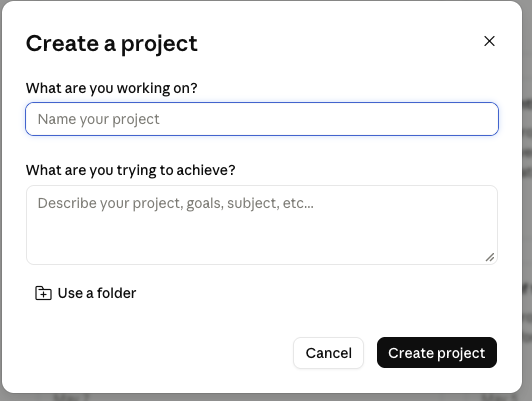
One thing to know: the folder connection happens when you create the project - as I write this, you can't attach a folder to an existing project. That's exactly why the filing system is step 1. Set up your folders first, and every project you create after that plugs straight in. (And while you're in there, you'll notice projects have levelled up in general - they can even run scheduled recurring tasks now.)
How I structure mine. I run a project for each part of the business:
- The War Room - my strategy space. This is my actual co-founder workspace, where I talk to Claude every day about what I'm doing, what I'm prioritising and where the business is going.
- One project per client - connected to that client's folder. From day one it's the brain for everything I do for them.
- Social media - my content strategy, pillars and drafts.
- One per build - anything I'm actively building gets its own space.
The one caveat: chats inside a project don't automatically share context with each other. Claude's own docs put it plainly: context is not shared across chats within a project unless it's added into the project's knowledge. Claude's memory features are improving all the time, but don't build your business on them - when you decide something important in a chat, save it back into the vault folder the project reads from. That's the discipline that keeps your co-founder current.
Option B: Claude Code - for building
Claude Code is Claude working directly on your computer. Instead of chatting in an app, it can open folders, read documents, create files, update your systems and build things - websites, trackers, client builds - right there on your machine.
For reading, it uses the same vault: "Go into the vault. Get up to date on my business, my identity and my vision. Then help me plan this launch." No uploading, no re-explaining.
For building, I give it a separate home - a workspace folder where everything it creates gets saved. Knowledge lives in the vault, output lives in the workspace, and the two never get tangled.
So which one do you use?
Both - for different jobs.
Claude Projects is where you chat. Regular projects go everywhere Claude goes - including your phone - and once a project is connected to a folder it's the easiest way to think, plan and work with your co-founder day to day. Client work, strategy, content, decisions: projects. One nuance: the connected folder lives on your computer, so the folder side of things runs through the desktop app - your phone is for the conversation, not the filing.
Claude Code is where you build. Websites, software, systems, automations - anything where the output is a real thing on your computer rather than a conversation. It's more of a learning curve, and you don't need it on day one.
My honest recommendation: set up the filing system, then set up your projects on top of it - a War Room and one per client, each connected to its folder. That's the two-layer setup that changes how your week feels. Add Claude Code when you're ready to start building.
One brain, every AI
Here's the part that makes the vault the most valuable asset you own: it isn't tied to one tool. My second AI assistant, Atlas, runs off the exact same vault. I update a document once, and everything I work with is aligned. All I have to do is keep the vault current - the setup does the rest.
Start today
Twenty minutes: download Obsidian, create the folder structure above, paste in your offers and one client's documents. Then create two projects - a War Room and that client - and connect each to its folder.
That's it. You'll feel the difference in the first conversation, because for the first time, your AI will answer like something that actually knows your business.
Where this goes next
What I've shown you here is the foundation. There are four more layers to how I delegate to AI, and each layer hands more of your week over: from AI that thinks with you, to AI that does the work, to AI that runs jobs without being asked.
I've broken the whole thing down in DELEG8: The 5 Layers of AI Delegation, my free guide to building your own AI setup layer by layer, in plain English, without needing to be technical.
Because the VA who runs her own business on AI is the one clients trust to bring AI into theirs.
this is the free stuff — imagine what we'd build together
Ready to make your business AI-enabled?
Consulting and one-to-one coaching for founders and freelancers who want AI actually working inside their business — not just talked about.
More guides
Build With AI
I gave myself one weekend to completely reorganise my business (& life) with Claude
Build With AI
The most important thing about AI employees isn't the skill, it's the system underneath
Build With AI
The number one missing piece to AI employees that actually work (and it isn't another skill)